Connect the device.
Power up NetworkPrivacyShield and follow the guided network setup.
Before ordering: confirm you have router admin access and can change DNS settings and reserve the Shield’s IP address. ISP-installed routers may lock these controls. Check compatibility and setup instructions →
PRIVACY, AT THE NETWORK LEVEL
Do you know what your devices are contacting while you’re sleeping? You will.
Make your smart TV (and everything else on your network!) a little less smart about you.
One small device. Local protection. No app on every screen.
THE ACTIVITY YOU DON’T SEE
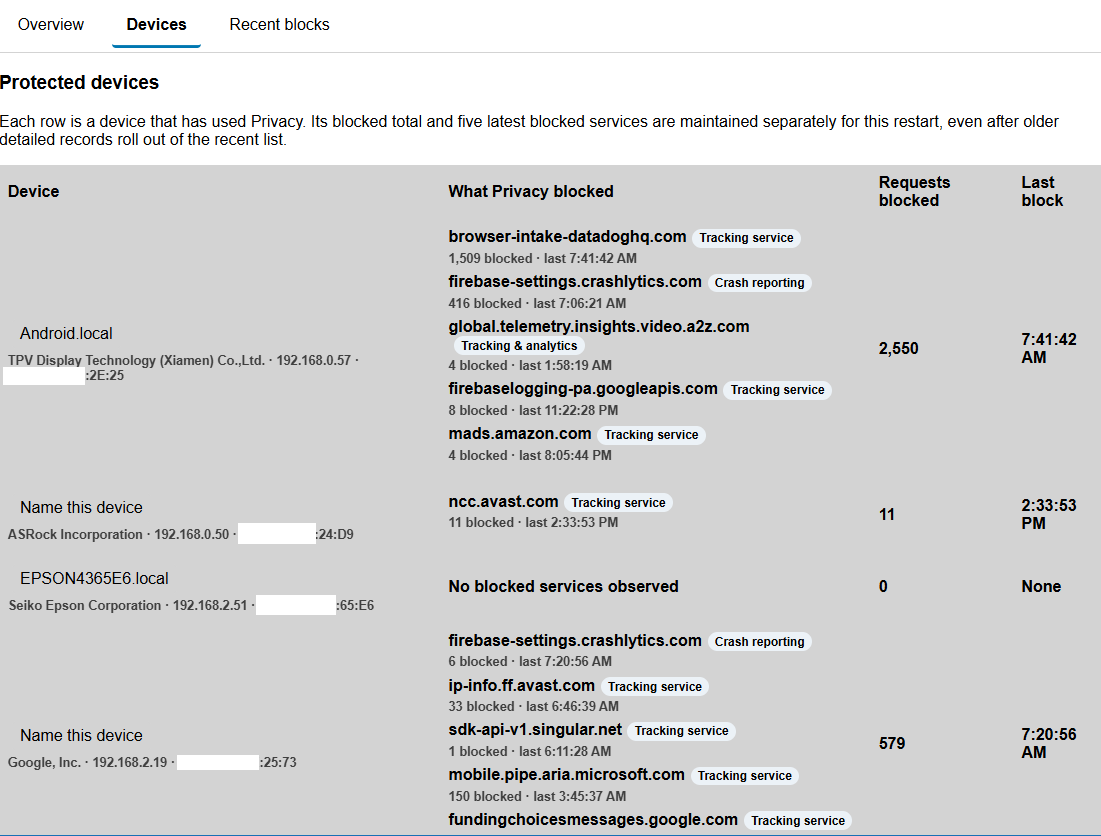
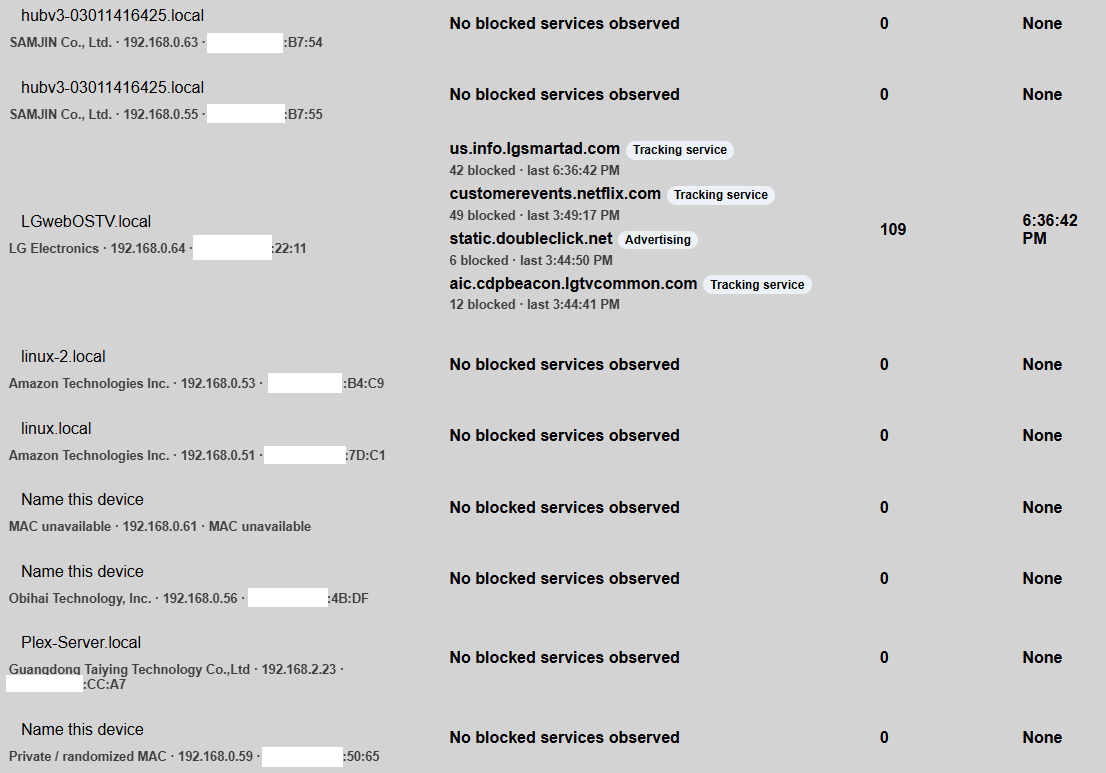
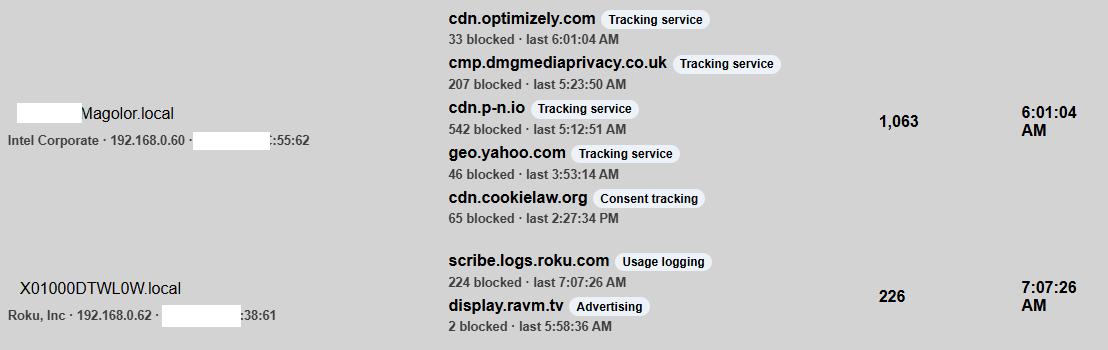
Smart TVs, streaming devices, and other connected products can contact advertising, analytics, telemetry, and usage-logging services in the background. NetworkPrivacyShield makes supported DNS activity visible—and blocks domains on its protection list.
Actual counts in the supplied screenshots, since that device’s restart. Examples, not live data or a promise of results. A blocked request is not proof of malware.
 View full size ↗
 View full size ↗
 View full size ↗
Screenshots show an example interface; appearance varies by firmware. DNS visibility is not a complete record of internet traffic. Encrypted DNS, hard-coded addresses, and cached lookups may bypass filtering.
Start here: device & router setup →
MEET YOUR PRIVACY SHIELD
See the real device and follow the setup walkthrough at your own pace. Pause at any step, rewind, or slow things down.
Having trouble playing? Open the MP4 directly.
Power up NetworkPrivacyShield and follow the guided network setup.
Set your router or supported devices to use Privacy Shield for DNS, following the setup guidance.
Open your local dashboard to see blocked requests. Activate your code for firmware and protection-list updates.
RIGHT AT HOME. ON YOUR NETWORK.
NetworkPrivacyShield filters DNS requests on your network. Open the local dashboard to see your connected devices and the requests it blocks.
Your subscription keeps firmware and the protection list up to date. The update service checks your device’s eligibility before delivering updates.
SMALL DEVICE. SIMPLE PRICING.
Both options include the device and your first year of firmware and protection-list updates. Choose how you want to renew.
Thank you. Your checkout was completed. Check your email for your NetworkPrivacyShield activation code.
SET IT. KEEP IT CURRENT.
BEST VALUE$29 today
Device + first year of firmware and blocklist updates.
Then $5/year automatically until canceled.
First $5 renewal is one year after purchase.
RENEW ON YOUR TERMS.
$29 today
The same device and the same first year of firmware and blocklist updates.
Updates expire after a year. Renew later for $10/year.
Choose a renewal when you’re ready.
The $5 auto-renewal and $10 annual renewal subscriptions renew yearly until canceled.
A CLEARER PICTURE
No. Advertising, analytics, crash reporting, and telemetry are common background services. A block means a requested domain matched the protection list—not that your device is infected or that every request is malicious.
No DNS filter can see or stop every connection. Devices must use Privacy Shield for DNS. Encrypted DNS, hard-coded addresses, cached lookups, and services sharing domains with essential content can limit filtering. Results vary by device and configuration.
No. Configure your router’s DNS where supported, or configure individual devices to use Privacy Shield. Router settings and compatibility vary; watch the setup demo before purchasing.
The included first year covers signed firmware and protection-list updates. An active update entitlement is needed to download new updates. The device retains its last-known-good protection list when an update is unavailable.
YOUR NETWORK. YOUR BUSINESS.
Know more about what your devices do.
Let them share a little less.